

What is an IMU? A Practical Guide to Inertial Measurement Units
If you are specifying a robot, an autonomous vehicle, a wearable or a piece of industrial equipment, sooner or later you need to know how it is oriented and how it is moving. The sensor that answers that question is an inertial measurement unit, or IMU. This guide explains what an IMU measures, what the numbers on a datasheet mean and what an IMU can and cannot do, using the Xikaku LPMS sensors as concrete examples.
The short definition
An IMU is a self-contained sensor that measures rotation rate and acceleration on three axes each, without any external reference. It works in the dark, underground, in a tunnel or inside a sealed machine, because it relies on inertia rather than on cameras, satellites or beacons. That independence is why IMUs appear in everything from aircraft to phones.
The three sensors inside
| Sensor | Measures | Contributes |
|---|---|---|
| Gyroscope | Angular velocity, °/s, on X, Y and Z | Fast, smooth changes of orientation |
| Accelerometer | Linear acceleration, g, on X, Y and Z | The direction of gravity, so roll and pitch, plus motion |
| Magnetometer | Magnetic field, gauss, on X, Y and Z | The direction of north, so absolute yaw |
Gyroscope and accelerometer together make a 6-axis IMU. With a magnetometer it becomes a 9-axis IMU. Many units add a barometer for altitude and a temperature sensor for compensation; the LPMS-B2, LPMS-U3 and LPMS-CURS3 carry both.
IMU or AHRS?
Strictly speaking an IMU outputs raw motion data and leaves the interpretation to the host. An attitude and heading reference system (AHRS) goes one step further and computes orientation on board. In practice most industrial IMUs today, including every LPMS model, are AHRS units: they stream raw data and fused orientation at the same time, as Euler angles (roll, pitch, yaw) and as a quaternion. That saves you from writing and tuning a fusion filter yourself and lets a modest microcontroller consume orientation directly over CAN or a serial link.
How the sensors are combined
Each sensor is blind in its own way. A gyroscope reports rotation precisely but has no idea where it started, and tiny errors add up until the estimate drifts away. An accelerometer can find down, but only when the unit is not accelerating. A magnetometer can find north, until a steel beam or a motor bends the field. Sensor fusion plays them against each other: the gyroscope carries the estimate from sample to sample, the accelerometer pulls roll and pitch back toward gravity, and the magnetometer pulls yaw back toward north, each weighted by how trustworthy it is at that instant.
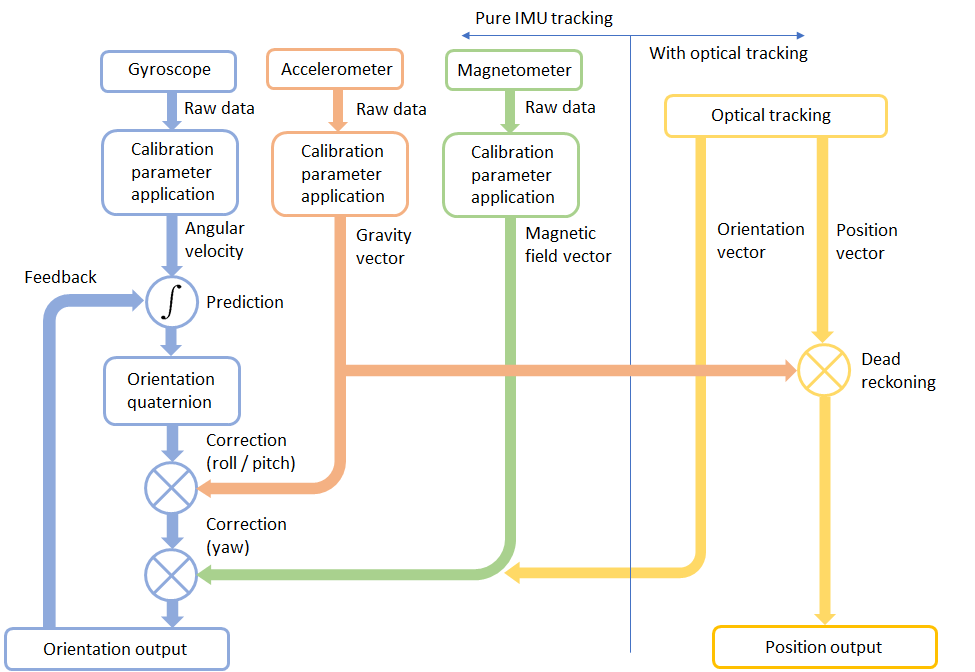
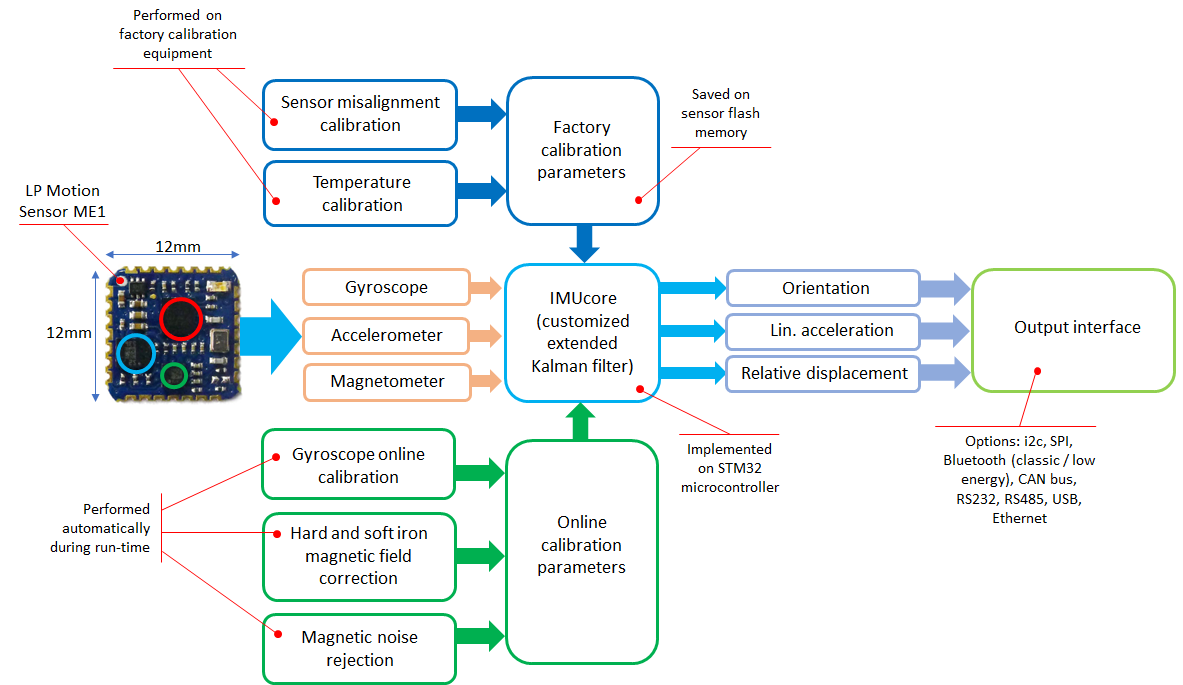
In LPMS sensors this runs as an extended Kalman filter on a 32-bit processor inside the housing. Factory calibration of axis misalignment and temperature behavior is stored in the sensor, and gyroscope bias, magnetic hard and soft iron distortion and magnetic noise rejection are calibrated continuously while the unit runs.
What an IMU cannot do
An IMU on its own cannot give you position for more than a few seconds. Position is acceleration integrated twice, so a small bias grows into meters of error very quickly. Every system that reports position from inertial data is fusing it with something else: GNSS outdoors, wheel odometry on vehicles, cameras or optical trackers indoors. That is why the LPMS-IG1P pairs its IMU with a GNSS receiver, and why our FusionHub software exists to combine an IMU with the other sensors on a platform.
Reading an IMU datasheet
| Term | Meaning | Why it matters |
|---|---|---|
| Range | Maximum rate (°/s) or acceleration (g) before clipping | Fast robots and vibration need ±2000 °/s or more |
| Resolution | Smallest angle step in the output, 0.01° on LPMS units | Fine control and motion analysis |
| Static / dynamic accuracy | Orientation error at rest and in motion | The number to compare between models |
| Noise density | Gyroscope noise per √Hz | Smoothness and short-term drift |
| Bias stability | Drift of the gyroscope zero point over time | Heading hold without a magnetometer |
| Sample and output rate | How fast the filter runs and how fast data is sent | Control loops, wireless bandwidth |
| Output types | Raw, Euler, quaternion, linear acceleration | Quaternions avoid gimbal lock; linear acceleration removes gravity |
| Interface and protocol | USB, CAN, RS232, RS485, TTL, Bluetooth, Wi-Fi; CANopen, LP-BUS, ASCII, MODBUS | Must match the host without adapters |
| IP rating and temperature | Ingress protection and operating range | Outdoor and industrial use |
Where LPMS IMUs are used
- Mobile robots and AGVs use the heading and tilt from an LPMS-NAV3 or LPMS-IG1 to navigate between wheel-odometry updates.
- Autonomous vehicle testing fuses an LPMS-IG1P with vehicle data for dead reckoning and for vehicle-in-the-loop simulation.
- Motion capture and sports science attach LPMS-B2 sensors to the body and stream orientation wirelessly.
- AR / VR on moving platforms combine LPMS sensors with optical tracking so that headsets stay stable in cars, simulators and aircraft.
- Maritime and structural monitoring use IP67 units and the LPMS-INC1 inclinometer for platform attitude and tilt.
Frequently asked questions
Is an IMU the same as a gyroscope? No. A gyroscope is one of the sensors inside an IMU. An IMU adds an accelerometer, and usually a magnetometer, and a 9-axis IMU with on-board fusion delivers full orientation.
Do I need a magnetometer? Only if you need absolute heading relative to north. Near motors, steel or power cables the magnetometer is a liability, and a 6-axis unit with a good heading gyroscope such as the LPMS-NAV3 is the better choice.
What data rate do I need? Control loops for legged or wheeled robots typically want 200 to 500 Hz; motion capture is happy at 100 to 400 Hz; structural monitoring often needs only a few hertz but high resolution.
Can I get GPS-free position from an IMU? Not for long. Pair it with odometry, optical tracking or GNSS.
Next steps
Compare all models on the sensor catalog, or read How to choose an IMU for a decision guide by application. If you would rather talk it through, contact us.