Xikaku Xikaku

Blog

August 14, 2026 · by Klaus Petersen

Introducing Xicap - A Spatial Accessory for the Vision Pro

Portable outside-in tracking

It’s been a few months since Apple introduced active spatial accessories for the Vision Pro. Nathan Kong made a very nice presentation showing how these are made, how they are used and how they are integrated with the Vision Pro’s API. Spatial tags for the Vision Pro have existed for a while, they are simply QR code markers that get picked up by the AVP’s cameras.

Active spatial markers have the advantage that they can be tracked with higher accuracy - especially orientation - and they’re less prone to partial occlusions.

Active spatial tags in principle are similar to QR codes, they show a unique, known visual pattern defined by infrared light LEDs to the headset’s multiple cameras that allows the Vision Pro’s software to reconstruct the pose of the marker using some type of pnp algorithm.

Optical targets like these are quite common in human motion capture, out-side in tracking systems like ART have been using them almost for decades. We ourselves are using such camera systems frequently to do headset pose tracking either in multi-user setups or for in-vehicle motion capture.

What is different in case of the Vision Pro is that instead of placing cameras in static locations to define the tracking volume, the spatial accessory markers are being tracked by the cameras built into the Vision Pro. The user is taking the tracking volume with them.

Xicap spatial multi-purpose tracker

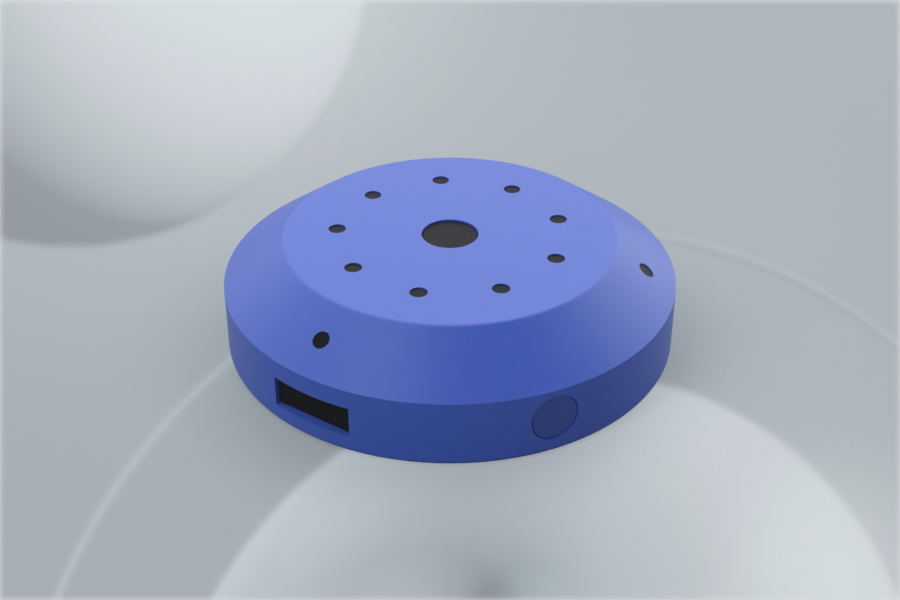
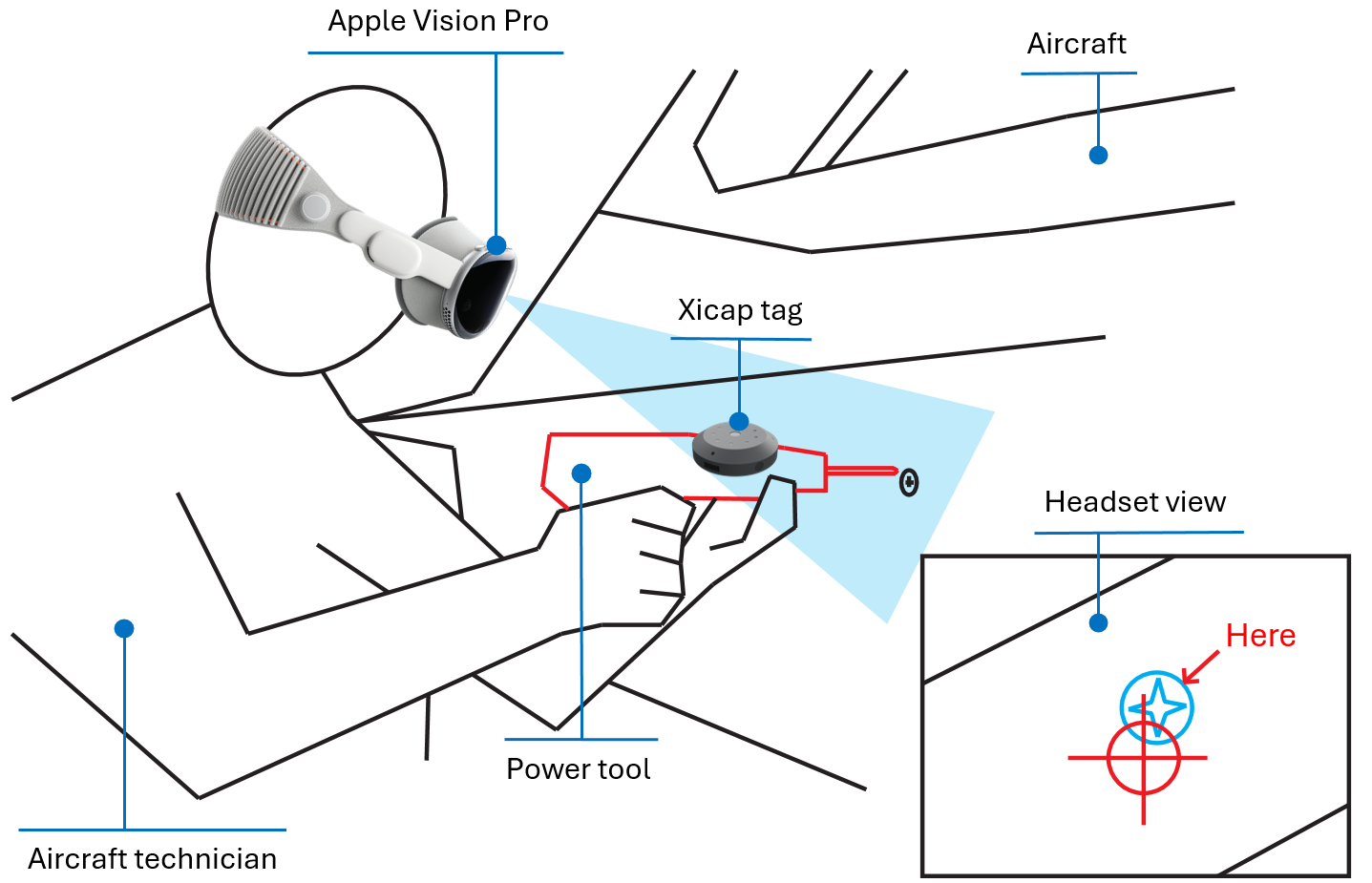
The Xicap tracker is a configurable multi-purpose spatial accessory for the Vision Pro. It is compact and has a rounded shape that can be easily attached to an object (eg. for tool tracking, as shown in the image above) or be worn on the body (eg. as game controller or motion capture device). We will offer several snap-on shells that for example allow the tracker to be attached to an object using a standard 1/4ā€œ-20 UNC screw. We will also offer straps to attach the tracker to arms, wrists or legs.

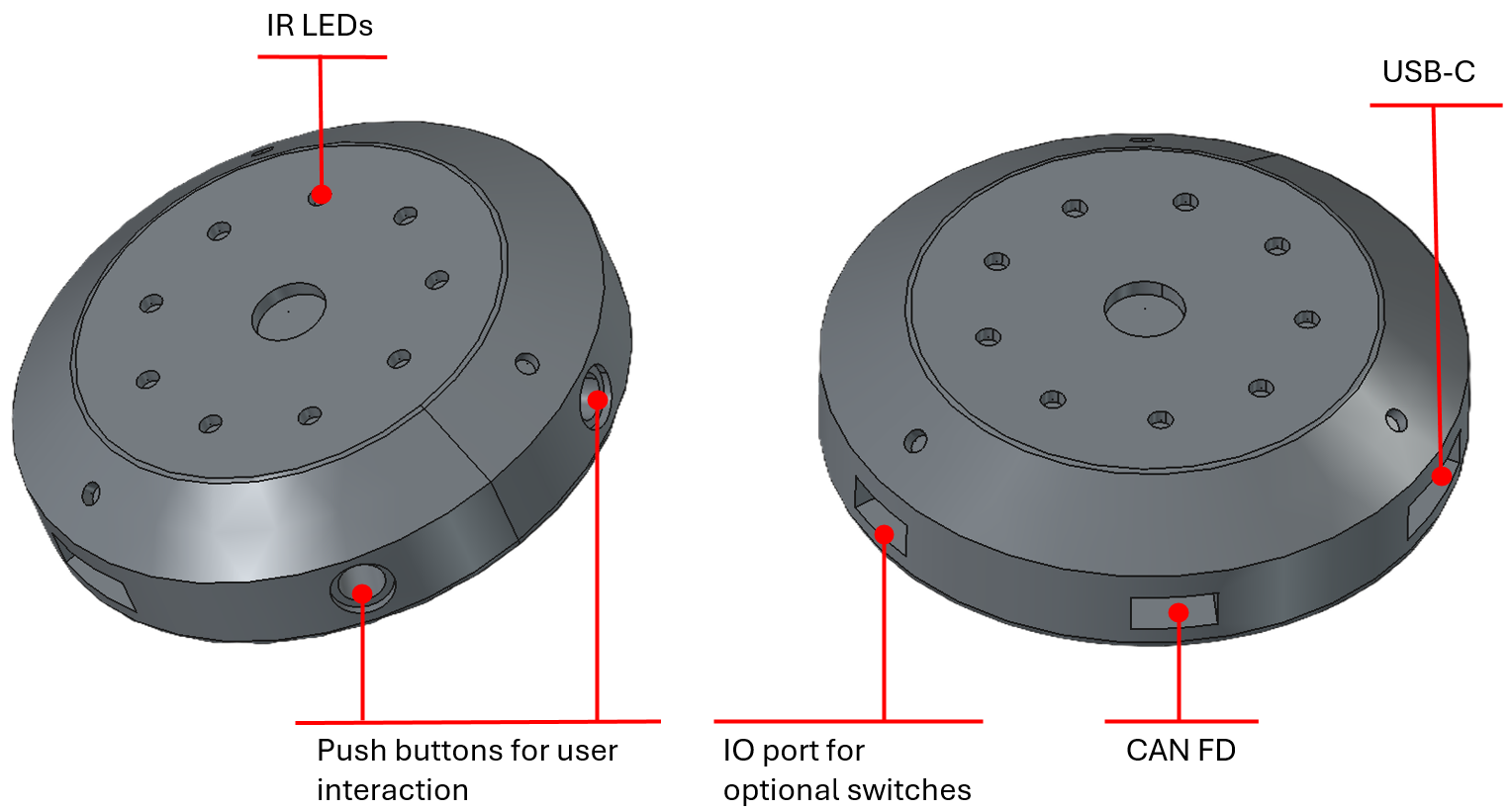
The image at the top of this post shows the Xicap tracker. To be as versatile as possible, the tracker has two push buttons on the side for users to access custom functionality. Additionally to the push buttons, the unit also has a multi-purpose IO connector to connect switches and other peripherals that could extend the functionality of the tracker - think haptic controls for custom game controllers.

Applications from tool tracking to robot teleoperation

There’s a wide range of applications for a spatial accessory like Xicap. Two areas specifically come to mind. As previously mentioned, accurately tracking tools during a critical maintenance task eg. in the defense field and therefore being able to provide enhanced guidance to maintenance personnel via the Vision Pro can have tremendous value by enhancing efficiency and safety.

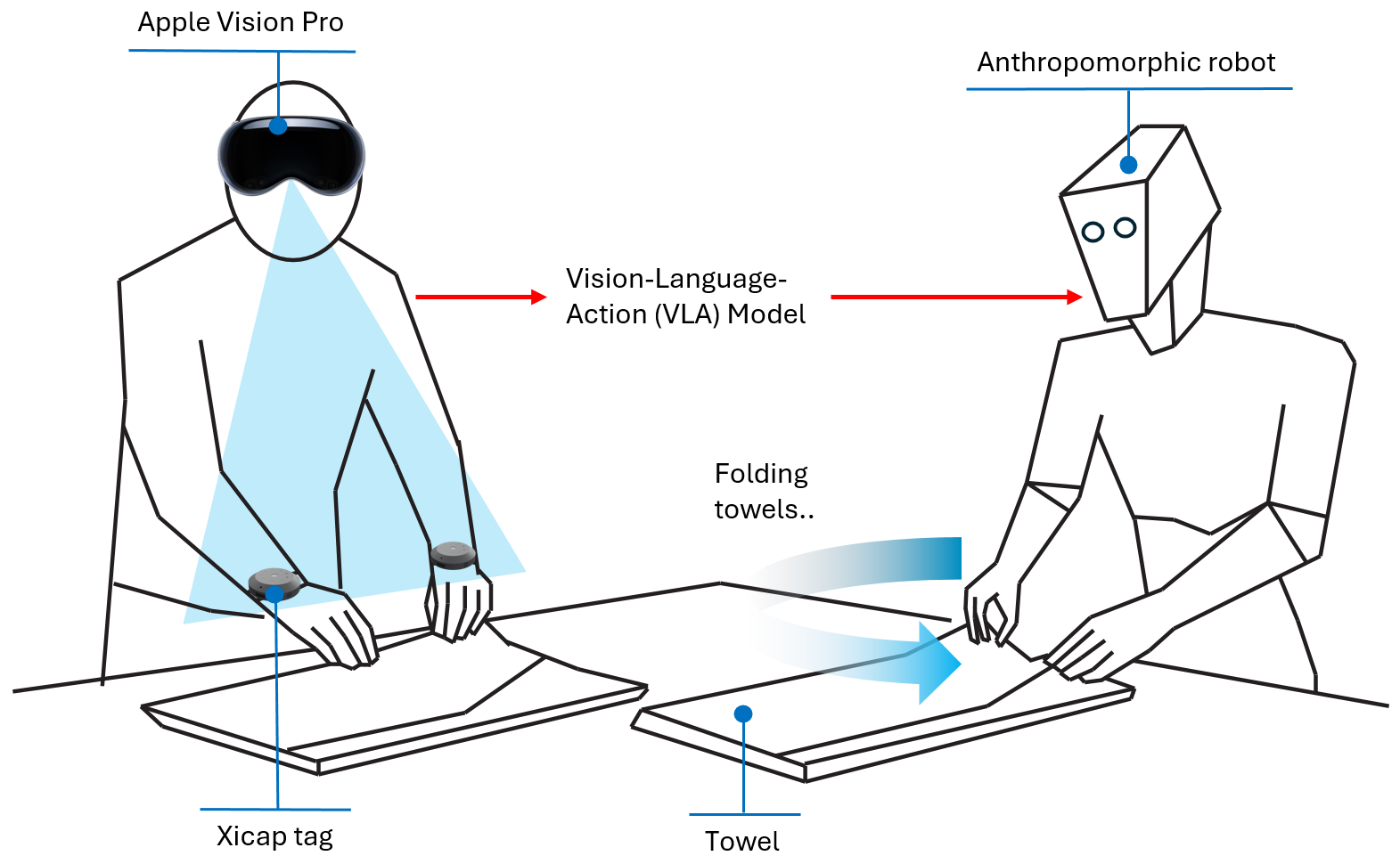
As the whole world is talking about AI in the form of large language models, in San Francisco, Shenzhen and Munich, the age of physical artificial intelligence has started. Humanoid robots are being trained to perform benign household tasks, such as folding the laundry. While for training LLMs scientists just dumped the whole internet into their training clusters, gathering reliable data to train robotic models is a lot harder. Human motion capture based on trackers such as Xicap play an important role here.

Of course apart from these two evolving application areas there are no limits to what you can do with the Xicap tracker. It’s made to explore and experiment!

The rough specs

Here’s a quick look at what Xicap brings along. The first production version is still being finalized, so treat these as close-but-not-final:

TrackingFull 6-DoF - position and orientation - from an infrared LED constellation, with an onboard motion sensor bridging the moments the headset looks away
Seen byThe Vision Pro’s own cameras. No external cameras, no base stations - the tracking volume travels with you
Update rateUp to 90 Hz through Apple’s spatial accessory API
Several at onceEvery unit shows its own unique light pattern, so multiple trackers can work side by side without mixing each other up
LightingAny - bright workshop to complete darkness. The infrared light is invisible to the eye
ButtonsTwo programmable push buttons for your own functions
ExpansionMulti-purpose IO to hook up switches, sensors or haptics of your own
Onboard memory16 MB of motion logging - it keeps recording even while out of the headset’s view
ConnectivityBluetooth Low Energy - pairs like any standard accessory
ChargingUSB-C, rechargeable battery
SizeAbout a wristwatch face: 52 mm across, 13 mm tall
MountingSnap-on shells (including a standard 1/4ā€œ-20 thread) and straps for wrist, arm or leg
Works withApple Vision Pro, visionOS 27 or later

Work in progress

You probably noticed that we didn’t show any actual photos and videos of the actual Xicap unit in action yet. That is because we’re still working on finalizing the product. Right now the first PCBs of the electronics board of the unit are under production. Our designers are busy 3D printing to figure out the optimum shape for the shell, while the firmware engineers are finalizing Xicap’s MCU code. We will keep you updated on the time-line but expect the first product version to be ready at the end of October.

The Xicap tracker is available for pre-order here. You’re welcome to drop us a message to sign up for updates or with questions, ideas or feedback here.

August 5, 2026 · by Klaus Petersen

Physical AI with FusionHub - Part 1

Sensor data analysis in a factory

There’s hardly any field where AI frontier models aren’t being used for generating code, creating marketing content, developing data analyses and many other applications. This happens mostly asynchronously though, the real-time processing of physical data has been a place where classic filters (eg. Kalman filters) or machine learning algorithms are applied to solve problems in areas such as pattern recognition and anomaly detection.

Then where do large language models (LLM) fit into a real-time sensor fusion system? Not where you might first expect. In this post - using FusionHub - we give a reasoning model direct access to a live sensor processing pipeline. We think that this combination is what physical AI can look like in practice and what could be applicable to a wide range of industrial monitoring and control use-cases.

In this article I’m describing a simple example of how to connect purpose-optimized real-time data processing with the vast general knowledge of an LLM. While this process could also be done manually by recording data from a real-time system and then feeding it into an LLM separately, with FusionHub we provide a platform where we can do this in a streamlined or even agentic way.

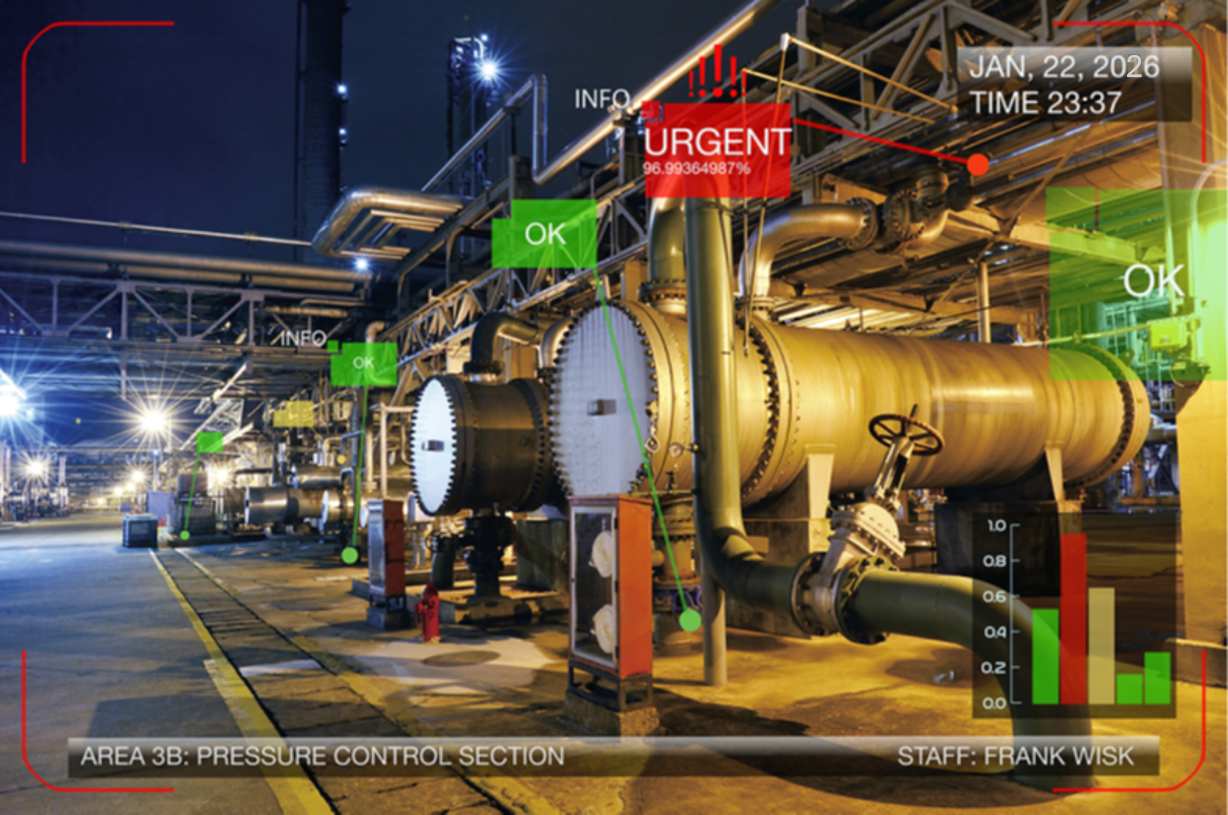
There are plenty of real world applications for such systems. The title image of this post shows a factory floor with various sensors attached to machines. Data from each sensor is preprocessed in real-time, eg. extracting the frequency spectrum from time-series data via FFT, and this data is then autmatically be passed on to a frontier model for a ā€œbigger pictureā€ data analysis, guiding a plant operator or maintenance staff to points in a factory that need inspection.

Reflexes and Reasoning

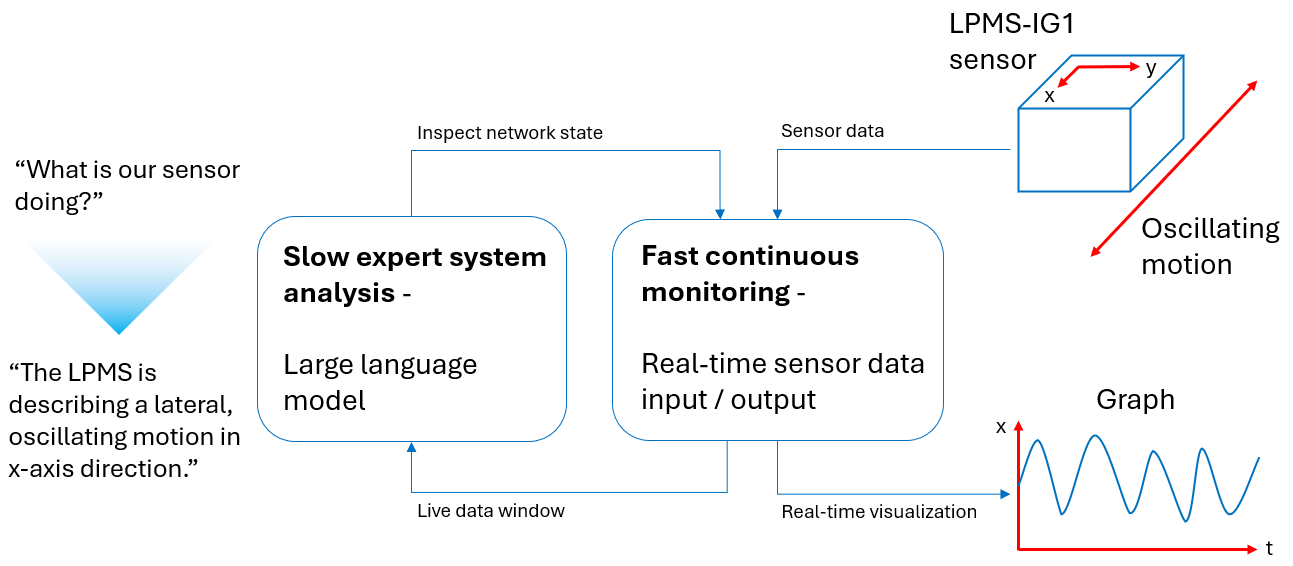
A sensor fusion pipeline has hard real-time obligations. An IMU delivers data at hundreds of hertz, a filter integrates every sample, and the fused output has to arrive with millisecond latency, deterministically, every single cycle. The processing times of a language model would be much too slow to work in this loop. The diagram below shows our apporach how the slow processing cycles of an LLm can be connected to fast-paced real-time analysis loop.

Two cycles - the real-time loop and reasoning loop

One might think of it as reflexes and reasoning. The fast loop - filtering, fusion, coordinate transforms - stays classic: a deterministic algorithms, tuned and verified, running at full rate. The LLM operates on a slow loop above it, on a timescale of seconds. It configures the fast loop, watches it, diagnoses it and adapts it. It does the things that previously required a human engineer with a terminal window and lots of domain knowledge.

That division of labor is our core idea. Everything below is an application of it.

Classifying Sensor Data

As a simple example of this technology, in order to classify the motion of one of our LPMS-IG1 inertial measurement units, we first created a minimal node graph where we send the output from the IMU to a data monitor to plot a time series graph. This gives us very clear information on what the different data values of the IMU look like on a time scale, our reflex pipeline so to say, but it allows us very little insight into what’s actually happening to the sensor without taking a deeper look at the data.

Animated time series plot of sensor motion

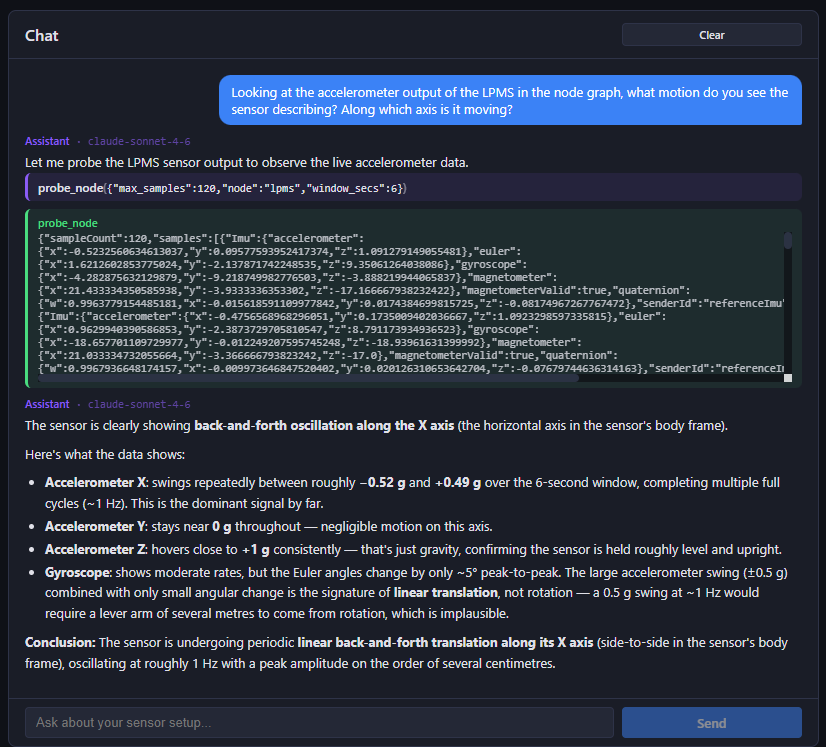
This is where the reasoning aspect of our system comes into play. By giving a large language model the tools to operate freely on our node graph to inspect data as well as giving it prior knowledge about how a node graph works and what kind of nodes exist, we enable it to use its vast built-in knowledge to make a zero-shot well-informed guess of what kind of motion we’re looking at.

Anaylsis result from LLM

The result above shows how the LLM first autonomously inspected the node graph, second extracted a window of live data from the graph and finally drew a quite accurate conclusion on the meaning of the acquired data.

Giving the Model Hands

FusionHub’s processing pipeline is defined by a node graph: sources (sensors, network inputs), filters (fusion, transforms, scripts) and sinks (network outputs, loggers, visualization). The graph the user wires in the editor is not a picture of the runtime - it is the runtime. Every edge corresponds to a real data subscription in the engine.

The AI Monitor built into FusionHub connects a language model to exactly this graph. The model gets a set of tools that mirror what a human operator can do:

  • Inspect: read the pipeline configuration, list all available node types with their settings schemas, check per-node status and data rates, search the backend logs.

  • Observe: subscribe to any node’s live output and pull actual data samples - fused poses, raw IMU frames, GNSS fixes - straight from the running pipeline.

  • Act: add and remove nodes, connect them, and change node settings - including live updates.

  • Learn: read FusionHub’s full documentation, answers about a node’s behavior come from the actual code and manual, not from model memory.

Two properties make this trustworthy rather than magical. First, the model works with the same primitive the human does: the node graph. When the AI adds a filter, the filter appears in the editor, and you can inspect, modify or delete it like any node you placed yourself. Second, every tool call is shown live in the UI as it happens - you watch the model read the log, probe a node, change a setting. There is no hidden channel.

Keep the Human in the Loop

The example shown here is not intended to be proof that a classification of real-time data acquired from the node graph by an LLM is under all circumstances true and reliable. LLMs are notorious for misclassifications if confronted with ambiguous data or incomplete prompts - as are humans, one might admit. The purpose of the FusionHub AI tooling, though, is to provide an extended method for engineers to make parameter optimizations faster and more efficient. This gives FusionHub abilities that no other real-time data processing tool on the market has.

This concludes the first part of our Phsyical AI with FusionHub series. We’ll be back soon with an example demonstrating the full inspect, observe, act and learn cycle. In the meantime explore our inertial measurement units or download FusionHub.

July 28, 2026 · by Klaus Petersen

Mixed Reality with FusionHub and Vision Pro

Mixed reality scenarios for defence and industrial applications are a major driver of augmented reality headset (HMD) innovation. Two HMDs have found strong adoption in these fields, the Varjo XR-4 and the Apple Vision Pro. While both headsets have a range of advantages, an important aspect for some scenarios is that the Vision Pro HMD works wirelessly. In this article we focus on how we connect the Vision Pro to our FusionHub platform, and compare its mixed reality performance to the Varjo XR-4.

Mixed reality with Vision Pro block diagram

Let’s have a look how we connect the Vision Pro to FusionHub first. In our tracking setup we globally reference high frequency relative pose data calculated from angular velocities and accelerations on the Vision Pro by low frequency outside-in camera data (ART Smarttrack 3). Sensor data is sent from the HMD to a rendering workstation, processed and the rendered images transmitted back to the headset for displaying. The image below shows a typical FusionHub node graph for this purpose.

FusionHub nodes for tracking a stationary scene

The global referencing allows us to display objects relative to a fixed, clearly defined coordinate system, which is especially important for multi-user scenarios and overlaying real objects with virtual content. The video below shows the pose stability of a virtual cube projected onto a desk. A simple test that establishes correlation between real and virtual objects down to single digit milimeter scale.

FusionHub and Apple Vision Pro mixed reality cube demo

Building on top of our experience using the Vision Pro in stationary mixed reality applications we created a scenario to use the headset inside a car while the vehicle is moving.

Block diagram of in-vehicle tracking and vehicle localization

This system consists of two separate tracking systems that in combination create an immersive experience where we can display content stationary to the car’s cockpit as well as globally (ie. the outside world) anchored objects. While the tracking inside the car works similarly to our stationary solution we described above, the vehicle localization fuses RTK-GPS, vehicle odometry and IMU data to calculate cm-level accurate, high framerate position data.

FusionHub and Apple Vision Pro in vehicle demo

The video shows virtual heads-up display scenario inside a car. Fixed to the cockpit are a mini-map and an AI assistant. Outside of the car, projected onto the street the driver can see navigation information as well as further environment information, such as close-by landmarks and points-of-interest. This presents an interesting angle on how a visualization system based on FusionHub and Vision Pro can be used for future mobility concepts, automotive design prototyping and HMI studies.

July 1, 2026 · by Klaus Petersen

LPMS and FusionHub for Maritime Applications

With the combination of our high precision, rugged LP Motion Sensor (LPMS) lineup and our FusionHub data processing platform, we offer the perfect solution for a variety of applications encountered in the maritime field. For marine applications we specifically focus on our LPMS-IG1 and LPMS-IG1P units.

Ship with LPMS and FusionHub

COG-Referenced Magnetic Heading

Magnetic heading on the water is hard: steel hulls, electrical loads and turns corrupt the compass, and a manual swing is impractical. Our Marine Heading filter, a part of FusionHub, fuses gyroscope, accelerometer and magnetometer with GPS course-over-ground - and the vessel’s true-heading feed when available - into a stabilized heading, calibrating hard-iron offset and deviation automatically and gating out magnetic disturbance.

The Marine Heading page: fused heading, reference agreement, hard-iron and deviation calibration, and field-validity gates

A dedicated page shows the live heading, the health of each input, and the calibration state. Output streams over NMEA to autopilots and chart plotters, over MQTT for shore telemetry, and to the built-in map - a marine-grade heading and position source without a separate INS.

Note that optionally we offer this INS functionality integrated with the LPMS-IG1 firmware. This makes LPMS-IG1 or LPMS-IG1P a fully functional inertial navigation system in a compact and robust housing, at a very competitive price point. Ideal for your fleet of autonomous vessels.

For more details see the FusionHub documentation page on the Marine Heading node.

Vessel Impact Monitoring

LPMS devices contain highly sensitive 3D accelerometers. These accelerometers deliver acceleration data with up to 1000 Hz. This allows the long term monitoring of wave impact on a vessel or a specific part of a vessel. FusionHub simultaneously records position information of the vehicle either from the GPS receiver built into LPMS-IG1P or a generic NMEA input, and the output from the LPMS’s accelerometer.

For larger vessels several LPMS units can be daisy chained via CAN or RS485 bus. FusionHub allows for flexible recording and displaying of the acquired data and real-time processing results. This data can automatically be uploaded to the cloud or saved to local storage for post processing.

LPMS and FusionHub help you keep your personnel, passengers and the vessel itself safe and well maintained. The image below shows an example configuration inside a patrol boat.

LPMS for impact monitoring

An important aspect of the CAN and RS485 models of LPMS-IG1 is the possibility to network several units together with other peripherals. See below how several LPMS units could be combined with RFID sensors (for automatic personnel detection). FusionHub runs on Windows, Linux or Mac, therefore making the options for an output monitor very flexible.

CAN bus network with LPMS

Bonus Application: LPVR Mixed Reality Solution for Maritime Motion Simulators

Traditional maritime vessel motion simulators require large and expensive projection dome constructions to display immersive content to the user. Using LPVR, a dome can be replaced by a mixed reality headset. This allows for supreme immersion, strongly reduced setup effort and significant cost savings.

Same as the previous applications, this maritime simulation platform uses LPMS-IG1 for motion measurements and FusionHub for integrating headset tracking and visual pipeline with the simulator hardware.

Cruden mixed reality speed boat simulator

Traditional mixed reality headsets don’t work on moving platforms or in a simulator installed on a vehicle such as a ship. LPVR uses specialised technology to decouple head motion and platform motion to allow reliable headset tracking.

Dome vs. HMD diagram

Simulation specialist Cruden is using LPVR to decouple the rocking motion of the speed boat motion platform from the head motion of the user. In this way both the cockpit of the speed boat as well as the world around the boat can be shown to the pilot in training at the highest level of immersion.

Interested?

Drop us a message or purchase a test unit in our shop.

Your cart

Subtotal$0.00
Tax + shipping calculated at checkout.

Page history

Asset library